

Highlights
Entri has officially launched its MCP Server, a new feature designed to keep users in-chat when it’s time to publish their project on a custom domain.
Previously a user who wanted to publish on a custom domain in an AI tool would have to leave the chat where they were working, navigate to their account or project settings, and initiate the Entri Connect or Sell flow.
Now, the agent can generate a Connect or Sell link directly in the chat, and the user can connect or purchase a domain directly from that link.
Here’s what to expect:
Conversational domain setup: Rather than forcing users out of chat interfaces and into account and project settings, users can generate a domain setup or purchase link directly from your chat interface.
Support for Sell and Connect: Use Entri’s MCP seamlessly with Sell and/or Connect
Generate relevant domain suggestions: Entri Sell MCP can use the existing chat context to generate domain suggestions relevant to the user, right in the chat
Flexible config options in dashboard: Generating DNS records dynamically instead of using a static set of records? Set this up easily under the MCP settings in the dashboard
Available on all plans: Enable Entri’s MCP on any Entri plan
How Entri’s MCP works
The Entri MCP Server is a remote HTTP server that exposes Entri's domain registration and DNS tooling as native MCP tools. Drop in a JSON config block and any compatible AI platform can generate domain suggestions, search availability, and generate a connect or purchase link, without leaving the conversation.
The Entri MCP Server exposes these six tools:
For domain registration (Sell product):
Entri Sell already SaaS companies to sell domains to their users in-app. Now with Entri MCP, Sell can be surfaced directly within AI chat interfaces, allowing users to purchase domains and publish projects almost instantaneously.
The following tools are available under the Entri Sell MCP server:
search-domain-availabilitychecks whether a domain is available and returns its registration and renewal pricing in-chat to the user.generate-domain-suggestionsuses AI to generate a list of available domain names based on keywords or a business description.create-domain-orderinitiates the purchase flow and generates a sharing link for the user in the chat.check-order-statuspolls the registration status until the domain is confirmed active or the order fails.
For DNS configuration (Connect product):
Connect is an API for DNS configuration that automatically sets up DNS records for end users. Using Entri
connect-domaingenerates a guided DNS configuration link for domains a user already owns, at any registrar.check-connection-statusmonitors propagation until the domain is fully pointed to its destination.
The partner’s AI decides when to call each tool, what to pass as arguments, and how to present the result to the user.
From the end user's perspective, it's just a conversation; for partners, it’s a massive opportunity to reduce user friction and drop-off, and decrease time to publish.
Generate relevant domain suggestions
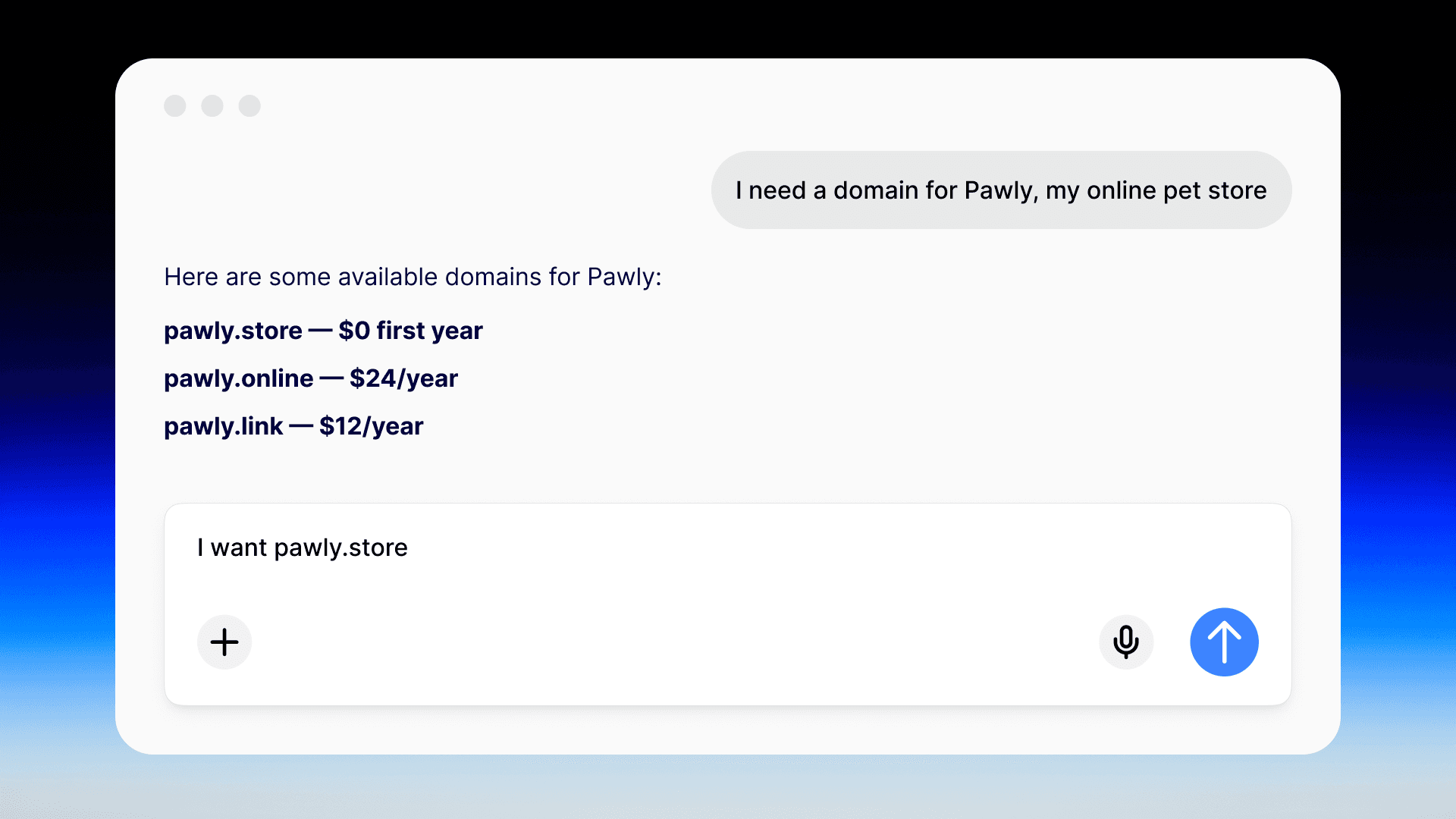
Most domain search experiences ask users to come in with an idea already formed. The user opens a search box, types something, and finds out that it's taken.
That's the wrong starting point for an AI-native workflow.
The Entri Sell MCP includes a generate-domain-suggestions tool that works differently. Instead of waiting for a user to supply a specific domain name, the AI pulls from the existing conversation context to generate a list of relevant, available options on the spot. End users can also shop for better deals or TLD-specific options, right in the chat.
When a user says something like "I'm building an AI coding assistant for developers," the AI doesn't just log that as background info and move on. It can immediately call generate-domain-suggestions with those keywords, check availability across a set of TLDs in real time, and return a curated list of options that actually fit what the user is building.
Under the hood, the tool queries Entri's suggestion engine with the extracted keywords, filters results to only return available domains, and sorts them by relevance. The AI presents those results directly in the conversation, complete with pricing, so the user can choose and register in the same exchange.
Learn more about the domain-suggestions tool here.
Support for dynamic record configuration
Some platforms generate DNS records dynamically, on a per-user or per-project basis. In those cases, hardcoding a DNS configuration isn't an option because the values don't exist until a project exists.
The Entri Connect MCP handles this through a configuration option in the Entri Dashboard. The connect-domain tool always returns a sharing link that opens a guided DNS setup flow for the user. What changes with dynamic configuration is what gets pre-loaded when that link opens.
By default, Connect uses a static configuration, where the DNS records and provider settings are defined once in the Dashboard and applied consistently across all users. For platforms where every user needs a different set of records, you can switch to a dynamic endpoint instead.
With dynamic configuration enabled, Entri calls your endpoint on each request rather than pulling from a fixed config. Your endpoint receives the userId as a query parameter so you can return a user-specific configuration, and Entri authenticates those requests using Basic Auth credentials you configure in the Dashboard.
Your endpoint just needs to accept GET requests, support Basic Auth, and return a valid Entri configuration object. Entri handles the rest.
Read more about this capability here.
Security and authentication
The Entri MCPs balance a frictionless domain purchase and configuration experience, with the security measures necessary to prevent abuse.
Entri MCP uses OAuth 2.0 M2M authentication (client credentials grant). Your Client ID and Client Secret are available in Dashboard → Application Settings → MCP Settings.
To obtain an access token, send a POST request to https://mcp.entri.com/token with Content-Type: application/x-www-form-urlencoded and the following parameters: grant_type=client_credentials, client_id, and client_secret. The response returns a short-lived Bearer token you include on each MCP request.
If you're configuring a desktop MCP client using mcp-remote (VS Code, Cursor, Windsurf, etc.), you can skip the token exchange and pass credentials directly as Authorization: Bearer CLIENT_ID:CLIENT_SECRET in your config JSON.
Optional contextual headers:
userId— End-user identifier (used bycreate-domain-order,connect-domain)geo— Two-letter country code for geo-based pricing (Sell only)
There is no session persistence between requests.
Tool availability is filtered per application. If your application only has the Sell product enabled, your AI will never see the DNS configuration tools, because they are stripped from the tool list before the AI receives it. This is enforced at the server level, not just the UI.
Taking domains from frictionless to conversational
Entri’s APIs are all about reducing friction around domains at the user level (because DNS confounds the best of us). Entri’s MCP takes frictionless domains to the next level, allowing AI-enabled platforms to initiate domain purchasing and setup conversationally within chatbots, vibe coders, and any other LLM-enabled user-interface.
Entri’s MCP is available on all Entri plans and supports Entri Connect and Sell. To learn more, set up a call with our sales team, or read more about this feature in our developer docs.